Editable 2025 Pocket Planner Canva KDP: A Practical Choice for Self-Publishers and Planners
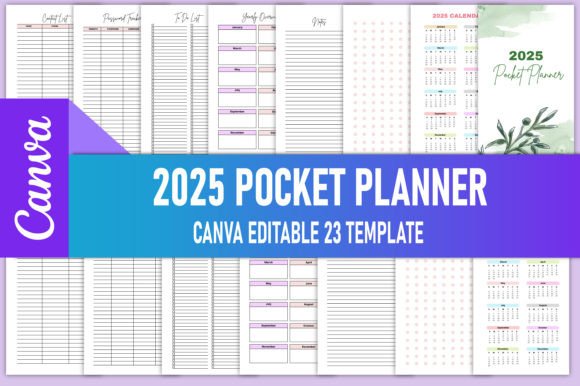
The Editable 2025 Pocket Planner Canva KDP is a ready-to-use, customizable digital planner designed specifically for creators preparing to publish on Amazon Kindle Direct Publishing (KDP). Unlike generic printables or static PDFs, this resource delivers both editable Canva access and high-resolution, KDP-compliant print files — all in one package. At its core, it’s a 23-page pocket-sized planner (4 × 6.5 inches) built around real-world publishing requirements: CMYK color mode, 300 PPI resolution, no bleed area, and KDP-tested dimensions. What sets it apart isn’t just its format — it’s the intentional balance between flexibility and production readiness.
What Makes This Editable 2025 Pocket Planner Canva KDP Distinct?
Most planners marketed to KDP sellers fall into two categories: fully static templates (no customization beyond text replacement) or overly complex design suites requiring advanced software skills. The Editable 2025 Pocket Planner Canva KDP bridges that gap. It includes an active Canva link you can duplicate into your own account — meaning you retain full editing control without needing Adobe Illustrator or InDesign. You’re not locked into someone else’s branding, font choices, or layout hierarchy. Want to swap out the password tracker for a habit log? Adjust the monthly spread to include time-blocking? Replace stock icons with your own illustrations? All possible — as long as you follow Canva’s export rules.
Equally important are the delivered assets: print-ready PDFs (CMYK, 300 PPI), plus PNG and JPG versions for marketing or previews. These aren’t upscaled or RGB-converted after the fact — they’re generated from the same source file used in Canva, ensuring consistency across platforms. That attention to technical detail matters when KDP rejects files for color profile mismatches or low resolution.
How It Compares With Other Planner Formats
When evaluating alternatives, consider three common paths: DIY creation from scratch, purchasing layered PSD/AI files, or using pre-formatted KDP templates sold on marketplaces like Etsy or Creative Market.
- Drawing from scratch gives maximum control but demands time, design literacy, and familiarity with KDP’s strict formatting guidelines — especially around margins, safe zones, and spine calculations for paperback versions. For someone launching their first planner, that learning curve can delay launch by weeks.
- Layered PSD or AI files offer precision but assume fluency in professional tools — and often lack built-in Canva integration. If you prefer drag-and-drop simplicity over layer masks and vector paths, those formats add friction rather than speed.
- Pre-formatted KDP templates are fast to use but rarely editable beyond basic text fields. Many don’t include interior pages like contact lists, yearly overviews, or password trackers — features embedded in the Editable 2025 Pocket Planner Canva KDP.
This planner stands out because it treats editing not as an afterthought but as part of the workflow. The Canva link isn’t a demo or placeholder — it’s the production source. And because Canva supports collaboration, version history, and mobile editing, it accommodates different working styles without sacrificing output quality.
Strengths and Realistic Tradeoffs
One clear strength is consistency across use cases. Whether you're building a branded planner series or testing niche themes (e.g., “Student Focus Planner” or “Minimalist Budget Tracker”), the Editable 2025 Pocket Planner Canva KDP provides a stable foundation. Its 23-page structure covers essential functions — monthly spreads, notes, to-do lists, contact pages — without overcrowding. That makes it easier to maintain readability at 4 × 6.5 inches, a size that fits comfortably in bags and coat pockets.
A tradeoff worth noting is dependency on Canva’s ecosystem. While convenient, it means edits require an internet connection and a Canva account (free tier works, but Pro unlocks additional fonts and brand kits). Also, users who rely heavily on custom typography may find some Google Fonts unavailable unless uploaded manually. There’s no native support for advanced features like auto-updating dates or conditional formatting — so if your goal is a truly dynamic digital planner with interactive elements, this remains a print-first tool.
Another practical limitation: the absence of bleed. That’s intentional — KDP doesn’t require bleed for interiors, and omitting it avoids accidental cropping during printing. But if you plan to expand later into hardcover editions or offset printing, you’ll need to adjust margins and re-export accordingly. This planner excels within its defined scope, not as a universal design system.
When This Editable 2025 Pocket Planner Canva KDP Fits — and When It Doesn’t
This resource suits creators who value speed *and* control — particularly those launching multiple planner variations per year or iterating based on customer feedback. For example, a productivity coach launching a “Focus & Flow” edition could adapt the existing layout in under two hours: changing colors to match their brand palette, inserting custom affirmations on note pages, and updating the cover mockup using included PNG assets. That agility supports experimentation without compromising KDP compliance.
It also serves well for non-designers entering the planner space. Someone with strong content ideas but limited visual skills can focus on copywriting, structure, and audience research — while relying on the template’s proven layout logic. The inclusion of functional pages like password trackers and contact lists reflects actual usage patterns, reducing guesswork about what buyers expect in a pocket planner.
That said, it’s less ideal for users needing heavy localization (e.g., right-to-left language support), extensive scripting (like automatic date calculations), or integration with external apps (Notion, Airtable). Nor does it replace editorial or proofreading services — the editable nature means responsibility for accuracy rests entirely with the user. If your priority is hands-off publishing with minimal customization, a fully pre-made, non-editable KDP interior might reduce decision fatigue — though at the cost of uniqueness and long-term scalability.
Practical Tips for Getting the Most From Your Editable 2025 Pocket Planner Canva KDP
Before diving into edits, take time to explore the original Canva document thoroughly. Navigate each page type, check font pairings, and test how text boxes behave when resized. Then, make your copy — not edit directly in the shared link. As the note reminds you: go to your Canva home, duplicate the file, and work exclusively in your version. This preserves the original link for future updates or team access.
When exporting, use Canva’s “PDF Print” option — not “PDF Standard” — to ensure CMYK conversion and embedded fonts. Double-check page count and orientation before uploading to KDP; although the file is tested, small oversights (like accidentally deleting a blank page or misaligning crop marks) can trigger review delays.
Finally, treat the included PNG and JPG files as strategic assets. Use them in your KDP description, social media teasers, or email newsletters to show realistic context — e.g., a photo of the planner open beside coffee and keys. Visual authenticity builds trust faster than feature lists alone.
If you appreciate how the Editable 2025 Pocket Planner Canva KDP balances usability with technical rigor, following the creator’s profile is a reasonable way to stay informed about future releases — especially updated versions for 2026 or specialized variants like weekly-only layouts or bilingual editions. But always evaluate each new product against your current goals, audience needs, and available time. Tools serve strategy — not the other way around.