Canva KDP Cover Templates for 8.5×11 Journals
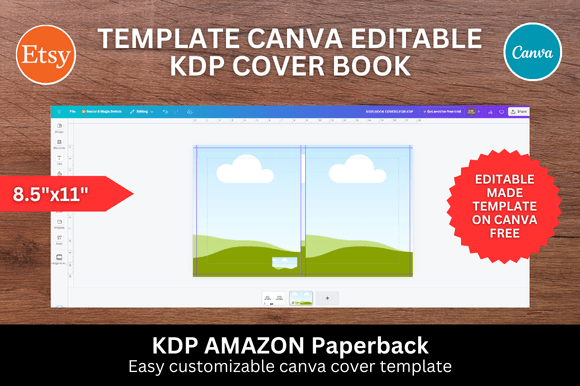
If you’re publishing low-content journals, notebooks, or guided planners on Amazon KDP—and you need a clean, professional, print-ready cover fast—Canva KDP Cover Templates are built exactly for your workflow. No design degree required. No expensive software subscriptions. Just one precise 8.5×11 inch template, optimized for KDP’s spine and bleed requirements, ready to open in your free Canva account.
This isn’t a generic “book cover” pack with mismatched sizes or unclear margins. It’s a single, purpose-built journal cover template sized to Amazon’s exact specifications for standard 8.5×11 inch interiors—meaning the front, back, and spine align correctly when uploaded. That precision eliminates guesswork, avoids KDP rejections due to trim or bleed errors, and saves hours of manual resizing and alignment in other tools.
Why Size Accuracy Matters More Than You Think
KDP requires covers to include 0.125-inch bleed on all sides and accurate spine width based on your interior page count and paper type. A template that’s even 0.05 inches off can cause text cutoff, misaligned graphics, or rejected uploads. These Canva KDP Cover Templates are pre-configured at 8.5 × 11 inches for the full spread, with clearly labeled safe zones and bleed guides baked into the Canva canvas. You don’t calculate spine width manually—you just enter your page count in KDP first, then match the template’s spine label (e.g., “0.25″ spine”) before uploading.
For example: A 120-page lined journal printed on standard white paper needs a ~0.31″ spine. The template includes that exact measurement—not a rounded “medium” or “large” option. That level of fidelity means your title stays centered, your logo doesn’t get clipped, and your barcode lands cleanly in the bottom-right corner of the back cover—every time.
Drag, Drop, Design—No Learning Curve
You don’t need to master layers, masks, or typography hierarchies. With Canva KDP Cover Templates, you simply drag your own photos, illustrations, or brand assets onto the layout. Replace placeholder text with your title and author name using Canva’s intuitive text tool—no font licensing concerns, since Canva’s free fonts are commercial-use safe. Adjust colors with one click. Resize elements proportionally. Preview in real time.
This speed is especially valuable if you manage multiple journal titles—say, gratitude journals for therapists, habit trackers for coaches, or themed notebooks for educators. Instead of rebuilding each cover from scratch in Photoshop or Illustrator, you duplicate the same proven 8.5×11 template, swap imagery and copy, and export in under 90 seconds. One designer reported cutting their cover creation time from 45 minutes to under 3 minutes per title—freeing up capacity to focus on content, marketing, or client work.
Who Benefits Most—and Why
Small business owners launching branded journals (e.g., yoga studios, counseling practices, fitness coaches) gain consistency across product lines without hiring a designer for every variation. A single Canva KDP Cover Template lets them maintain cohesive color palettes, logo placement, and tone—even when updating seasonal themes.
Educators and curriculum designers creating printable journals for classrooms or homeschool use appreciate how easily they can add school logos, grade-level tags (“Grades 3–5”), or subject icons (math symbols, science illustrations) directly onto the template—then share editable links with teaching teams.
Freelance writers and self-publishers testing niche journal concepts (e.g., “Budget Planner for Freelancers,” “ADHD Daily Focus Journal”) use these templates to rapidly prototype covers, validate demand via mockups, and iterate based on audience feedback—before investing in custom design or bulk printing.
Even hobbyists turning passion into side income find value: someone illustrating floral patterns or hand-lettered quotes can build a library of journal covers in Canva, then license the designs as editable templates to other creators—using the same base file they started with.
What’s Included—And What’s Not
The package delivers exactly what’s promised: one Canva KDP Cover Template, sized precisely for 8.5×11 inch journals, fully editable in Canva’s free tier. No hidden upsells. No watermarked previews. No need for Pro features—text shadows, transparency sliders, and basic image filters work fine with the free plan.
It does not include interior pages, copyright pages, or KDP formatting guides—but those aren’t needed for the cover alone. If you’re also building interiors, Canva offers separate journal interior templates (lined, dotted, blank) that match this cover’s dimensions—so your inside pages flow seamlessly into the cover’s visual rhythm.
It also doesn’t replace professional design for complex branding needs—like multi-language covers, intricate foil-effect mockups, or highly regulated categories (e.g., medical journals requiring disclaimers). In those cases, pairing this template with light customization + a final review by a designer is a smart hybrid approach.
A Realistic Time-Saving Benchmark
Creating a KDP-compliant cover from scratch—including research, sizing, bleed setup, font licensing checks, and KDP preview testing—typically takes 2–4 hours for someone familiar with design tools. With Canva KDP Cover Templates, that drops to under 5 minutes once you’ve done it once. The first time, you’ll spend ~10 minutes learning where to place your barcode and how to adjust bleed-safe zones. After that? It’s truly drag-and-drop.
That reclaimed time adds up: 10 journal titles × 3.5 saved hours = nearly 2 full workdays recovered per month. For solopreneurs juggling writing, marketing, and fulfillment, those hours often translate directly into higher-quality content, deeper audience engagement, or better rest.
Getting Started Is Literally Two Clicks
1. Open the template in Canva (no download needed—just click “Use template”).
2. Upload your image or logo, drag it into position, edit text, and hit “Share” → “Download” as PDF Print (CMYK, 300 DPI).
No file conversions. No margin warnings. No “your file exceeds KDP’s max upload size” alerts—because Canva exports optimized, print-ready PDFs by default. And since the template lives in your Canva account, you can return to it anytime to refresh covers for new editions, seasonal updates, or A/B test variations.
Whether you're launching your first Amazon journal or scaling a catalog of 50+ low-content products, Canva KDP Cover Templates remove friction—not creativity. They give structure so your ideas land clearly, professionally, and on time.