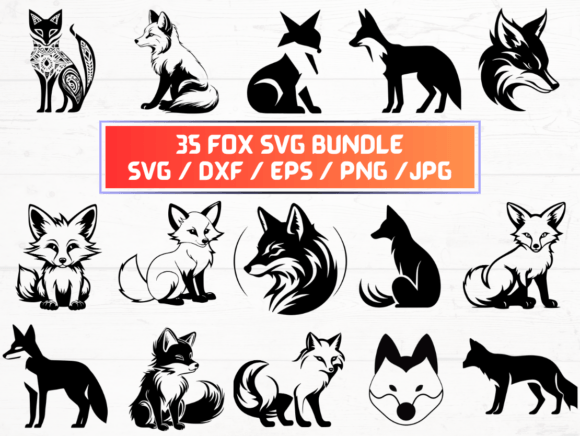
Fox SVG, DXF, EPS, JPG & PNG Files: Your All-in-One Digital Craft Resource
Whether you're cutting vinyl on a Cricut or Silhouette, prepping artwork for screen printing, designing custom apparel, or building layered digital illustrations in Adobe Illustrator — having clean, versatile, and production-ready fox-themed vector files makes all the difference. This collection isn’t just another generic animal pack. It’s a thoughtfully assembled set of Fox SVG, DXF, EPS, JPG, and PNG files — 35 of each — optimized for real-world use across creative platforms and physical output methods.
Why Format Variety Matters More Than You Think
Not all design software speaks the same language — and not every project demands the same file type. That’s why this bundle includes five distinct formats, each serving a specific role in your workflow:
- Fox SVG files are ideal for web-based editors (like Cricut Design Space), modern browsers, and responsive UI mockups. They scale infinitely without pixelation and support embedded styling and interactivity.
- DXF files bridge the gap between design and fabrication. CNC routers, laser cutters, and older CAD programs rely on DXF for precise vector path interpretation — especially useful if you’re etching fox silhouettes into wood or acrylic.
- EPS files remain a trusted standard for professional print workflows. Their PostScript foundation ensures compatibility with legacy RIP software and high-end offset printers — critical if you’re sending artwork to a local print shop for banners or signage.
- JPG files offer universal compatibility for quick previews, social media posts, email attachments, or embedding in presentations. These are high-resolution (300 dpi) and optimized for clarity — though they lack transparency.
- PNG files give you that crisp, transparent-background flexibility perfect for overlays, web graphics, digital scrapbooking, or mockup templates where the fox needs to sit cleanly over photos or gradients.
Having all five formats in one ZIP folder means no last-minute format conversions, no compatibility headaches, and no need to hunt down alternate versions when switching tools mid-project.
Designed for Speed, Precision, and Creative Freedom
This isn’t a single fox outline repeated 35 times. Each of the 35 designs is unique — ranging from minimalist line art and bold silhouettes to detailed woodland scenes, playful cartoon foxes, and elegant monochrome linocut-style motifs. Some include subtle textures; others are built with clean anchor points and minimal nodes for smoother cutting paths.
Every Fox SVG and DXF file has been manually reviewed to ensure smooth curves, properly joined paths, and no stray points — because nothing derails a cutting job faster than an ungrouped layer or an open path. Likewise, each EPS and PNG file maintains consistent color fidelity and resolution integrity, whether opened in Affinity Designer, CorelDRAW, or even Microsoft PowerPoint.
How These Files Fit Into Real Creative Workflows
Let’s talk practicality. Here’s how users actually apply these files — beyond just “cutting and pasting”:
- Small business owners use the Fox JPG and PNG files to create Instagram story highlights, Etsy banner headers, or printable packaging labels — all while keeping branding cohesive and visually engaging.
- Teachers and homeschoolers pull the Fox SVG files into classroom projects — think paper-craft fox masks, laminated learning cards, or interactive bulletin board displays. The transparency in PNGs also helps them layer elements onto themed worksheets without white boxes.
- Embroidery designers import the DXF or EPS versions into Wilcom or Embrilliance to auto-digitize outlines — saving hours compared to redrawing from scratch.
- SVG sublimation sellers combine multiple Fox SVG layers with text and backgrounds to build heat-transfer designs for mugs, tumblers, and tote bags — all while preserving editable vectors until final export.
- Print-on-demand creators drop the high-res JPG and PNG files directly into Redbubble, Teespring, or Printful dashboards — no resizing, no compression warnings, no guesswork about minimum dimensions.
What Makes This Bundle Stand Out From Other Fox Graphics?
It’s easy to find free fox clipart online — but quality, consistency, and licensing clarity are rare. Here’s what sets this collection apart:
- No hidden watermarks or upsell traps. What you see is what you get — 35 complete designs, each delivered in five usable formats, all included in one instant-download ZIP.
- Commercial-use friendly. You’re cleared to use these Fox SVG, DXF, EPS, JPG, and PNG files in client work, physical products, digital goods, and even resale items — no attribution required.
- Optimized for both beginners and pros. New crafters appreciate the plug-and-play simplicity of ready-to-cut DXF and SVG files. Seasoned designers value the clean EPS structure and layered PNG options for compositing.
- Consistent naming and organization. Files are logically grouped (e.g., “fox-silhouette-07.svg”, “fox-detailed-22.png”) — making it fast to locate the right version when juggling tight deadlines.
Smart Tips Before You Start Using Your Fox Files
A few quick considerations to help you get the most out of your download:
- Always unzip first. Some devices try to open ZIP folders as archives — but your cutting machine or design app needs the individual files inside. Extract the folder before importing.
- Match format to function. Don’t force a JPG into your Cricut — it won’t cut. Use SVG or DXF for cutting machines, PNG for overlays, EPS for print prep, and JPG for web sharing or quick reference.
- Check your software’s import settings. In Silhouette Studio, for example, DXF imports may default to grouped layers — ungroup to edit individual components. In Illustrator, EPS files sometimes open in legacy mode; double-click the thumbnail to edit vectors natively.
- Scale mindfully. While vectors (SVG, DXF, EPS) scale infinitely, raster files (JPG, PNG) are fixed at 300 dpi. Enlarging them too far will cause blurriness — stick to their native size or smaller for best results.
- Back up your files. Since this is a digital-only product, save copies to cloud storage and an external drive. No physical backup means your creative momentum depends on smart file management.
Who Benefits Most From This Collection?
You don’t need to be a full-time designer to benefit. In fact, this bundle shines brightest for people who wear multiple hats — like makers running Etsy shops, educators building lesson kits, or side-hustlers launching merch lines. If you regularly switch between crafting, printing, and digital publishing — and want to avoid format friction — having reliable Fox SVG, DXF, EPS, JPG, and PNG assets saves time, reduces errors, and keeps your output looking polished.
Even hobbyists report noticeable differences: cleaner cuts, sharper prints, faster mockup turnarounds, and more confident experimentation. One customer used the DXF files to laser-cut a set of wooden fox coasters — then reused the matching PNG files to design coordinating gift tags and social media announcements. Another stitched fox appliqués using the SVG outlines, then added motion blur effects in Photoshop using the high-res JPG versions as base layers.
Final Thought: It’s Not Just About Foxes — It’s About Workflow Confidence
At its core, this collection solves a quiet but persistent pain point: the friction between inspiration and execution. You imagine a fox-themed nursery decal, a rustic wedding favor tag, or a nature-inspired t-shirt design — and instead of wrestling with incompatible files or scaling issues, you open the ZIP, pick your favorite fox, choose the right format, and go.
That’s the power of intentionality in digital asset creation. Every Fox SVG, DXF, EPS, JPG, and PNG file here was built to behave predictably, render cleanly, and integrate smoothly — so your creativity stays front and center, not your troubleshooting.