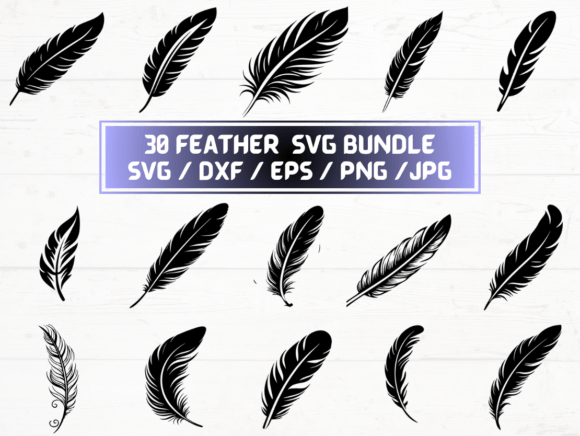
Feather SVG Files: A Practical Evaluation for Designers and Crafters
Feather SVG refers to a collection of digital vector and raster files designed around feather motifs—often stylized, scalable, and optimized for use in digital design and physical fabrication. Unlike a single graphic or font, Feather SVG typically denotes a curated set of files (SVG, DXF, EPS, PNG, JPG) intended for consistent application across platforms and tools. This article helps you assess whether such a collection aligns with your practical needs—whether you're preparing for a craft project, designing marketing assets, or integrating decorative elements into a larger workflow.
What Feather SVG Files Actually Are
At its core, a Feather SVG package is a digital asset bundle. The “SVG” in the name highlights one key format—Scalable Vector Graphics—but the value lies in the multi-format support. Each file type serves a distinct purpose: SVG for web use and vector editing in browsers or apps like Inkscape; DXF for CNC machines and laser cutters; EPS for legacy print workflows; high-resolution PNG (300 dpi, transparent background) for overlaying on photos or presentations; and JPG for quick previews or web thumbnails. Importantly, these are not fonts, brushes, or layered PSD files—they’re flat, ready-to-use graphics.
Why Someone Might Consider Feather SVG
Designers, educators, small-business owners, and hobbyists often seek Feather SVG files for specific functional reasons—not just aesthetic appeal. For example, a maker planning custom greeting cards may need clean, scalable feather outlines that hold detail when resized from 1 inch to 8 inches. A textile designer might require precise DXF paths for embroidery digitizing software. A teacher creating classroom visuals may prioritize transparent-background PNGs for easy insertion into Google Slides. The motivation is rarely about “feathers” as a theme alone—it’s about having production-ready assets that reduce manual tracing, conversion, or scaling errors.
Key Benefits and Real-World Tradeoffs
The primary benefit of a Feather SVG bundle is format versatility. Having all five formats (SVG, DXF, EPS, PNG, JPG) means less time converting files and fewer compatibility surprises. You can import the DXF directly into LightBurn or Cricut Design Space, paste the SVG into Figma or Illustrator, and drop the PNG into Canva without transparency issues.
However, there are tradeoffs. First, consistency across formats isn’t guaranteed: minor path simplifications or rasterization artifacts may appear in DXF or EPS versions compared to the original SVG. Second, 30 designs may sound generous, but if your project requires very specific styles—e.g., realistic anatomical feathers versus minimalist line art—you’ll need to preview each before purchase. Third, because this is a digital-only product, there’s no physical sample, packaging, or customer support beyond what’s stated—so clarity in file naming, organization, and preview images becomes essential.
When Feather SVG Is a Strong Fit
This type of bundle works best when your goals emphasize efficiency and cross-platform reuse. It suits users who:
- Already own or regularly use vector-editing or cutting-machine software (e.g., Adobe Illustrator, Silhouette Studio, Inkscape, or Glowforge Print & Cut);
- Need consistent styling across multiple outputs—for instance, using the same feather motif on a business card (EPS), website banner (SVG), and vinyl decal (DXF);
- Prefer predictable, standardized assets over custom illustration—especially in time-constrained environments like classroom prep or rapid prototyping;
- Are comfortable managing ZIP archives and organizing digital assets locally, rather than relying on cloud-based libraries or subscription services.
In these cases, Feather SVG delivers measurable time savings—eliminating the need to trace, redraw, or reformat from scratch.
When Alternatives May Be Worth Considering
Feather SVG is less ideal if your needs fall outside its scope. For example:
- You require editable layers or color variants. Most Feather SVG bundles deliver flat, single-color paths. If you need separate calamus, vane, and barbule layers—or built-in color swatches—you’ll likely need custom illustration work or layered AI/EPS files not included here.
- You’re building a brand identity system. A set of 30 feathers offers variety, but lacks typographic pairing, usage guidelines, or responsive scaling rules. Brand systems benefit more from bespoke design than pre-packaged motifs.
- You rely heavily on mobile-first tools. While SVG works in many mobile apps, DXF and EPS are rarely supported on iOS or Android. If your workflow happens mostly on tablets or phones, PNG and JPG become your only immediately usable formats—and even then, editing flexibility is limited.
- You need licensing for commercial redistribution. Unless explicitly stated, most Feather SVG bundles grant personal and small-business use only—not rights to resell the files as part of another digital product or template pack.
Practical Decision-Making Insights
Before acquiring Feather SVG files, ask yourself three questions:
- Which format will I use first? Identify your primary tool (e.g., Cricut Design Space → prioritize DXF; web development → prioritize SVG). Then verify that format is present and well-structured (e.g., DXF paths are closed, not open polylines).
- Do I need uniformity or diversity? If you’re creating a series—like 12 social media posts—one cohesive style matters more than 30 variations. Check preview thumbnails for consistent stroke weight, proportions, and negative space.
- How much post-processing am I willing to do? Even high-quality Feather SVG files may require minor cleanup: joining overlapping paths, adjusting anchor points for smoother cuts, or resizing PNGs to match your layout grid. Factor in that time versus the cost of hiring an illustrator.
Also consider scalability: SVG and DXF scale infinitely without quality loss, but JPG and PNG are fixed-resolution. If you anticipate printing large-format banners or embroidering on fabric, confirm the PNGs truly render cleanly at 300 dpi—even when enlarged beyond their native dimensions.
Final Considerations
Feather SVG is neither inherently superior nor inferior to other design resources—it’s a tool shaped by context. Its usefulness depends less on the subject (feathers) and more on how well the files integrate into your existing pipeline. Evaluate based on technical fit—not visual appeal alone. Look for clear documentation, accurate previews, and straightforward file naming (e.g., “feather-07-dxf” rather than “design32”). And remember: digital delivery means immediate access, but also places responsibility on you to verify compatibility before beginning your project.
If your workflow values precision, repeatability, and multi-software support—and you’re confident in managing vector assets—then Feather SVG can be a practical, time-efficient choice. If your goals center on customization, narrative depth, or platform-agnostic simplicity, exploring alternatives like licensed illustration services or open-source vector repositories may better serve your long-term objectives.