Highland Cow SVG Files: A Practical Guide for Crafters and Designers
Highland Cow SVG refers to scalable vector graphic files featuring the iconic shaggy, horned cattle native to the Scottish Highlands. These digital assets are optimized for precision cutting, printing, and digital design—making them especially useful for crafters using machines like Cricut or Silhouette, as well as designers integrating animal motifs into branding, apparel, or home décor projects. Unlike hand-drawn illustrations or generic livestock clipart, a well-crafted Highland Cow SVG captures key breed characteristics: long wavy hair, pronounced horns (often curved outward), expressive eyes, and sturdy build—rendered in clean, editable paths.
What’s Included—and Why File Variety Matters
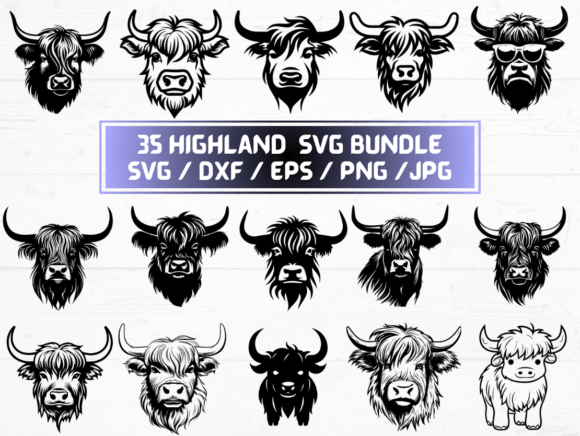
This particular Highland Cow SVG offering delivers five file formats across 35 unique designs: SVG, PNG (300 dpi with transparent background), DXF, JPG, and EPS. That breadth isn’t just convenience—it reflects real-world workflow needs.
- SVG is the go-to for most modern cutting machines and web-based design tools. Its vector nature means it scales infinitely without pixelation and supports layering and color separation.
- DXF remains essential for older or industrial-grade cutters (e.g., some Roland or Graphtec models) that don’t natively read SVG. It preserves vector geometry but lacks embedded color or styling data.
- PNG at 300 dpi with transparency suits print-on-demand services, digital scrapbooking, or overlay work in Photoshop or Canva—where crisp edges and background removal matter more than scalability.
- EPS serves legacy Adobe Illustrator workflows and certain large-format printers that rely on PostScript compatibility.
- JPG offers broad compatibility for quick previews, social media posts, or low-stakes digital use—but lacks transparency and isn’t suitable for precise cutting.
Having all five formats in one ZIP folder reduces friction: no need to convert files manually or risk quality loss through online converters. That consistency becomes valuable when managing multiple projects across different tools or collaborators.
How Highland Cow SVG Compares to Other Animal Vector Options
Not all animal-themed vector sets deliver equal utility. Generic “cow” or “cattle” SVGs often prioritize simplicity over breed accuracy—flattening horns, omitting texture cues, or stylizing features beyond recognition. In contrast, a dedicated Highland Cow SVG set tends to emphasize silhouette fidelity and characteristic details: the double coat (long outer guard hairs and soft undercoat), the sweep of the horns, and even regional variations like black, red, or brindle coloring.
This distinction matters most when authenticity supports intent. For example:
- A Scottish-themed wedding invitation benefits from accurate Highland Cow SVG motifs—not just any bovine shape.
- An educational poster about native UK livestock gains credibility with anatomically appropriate outlines.
- A textile designer developing a heritage-inspired fabric line may rely on those subtle proportions to maintain visual cohesion across patterns.
That said, if your goal is abstraction—say, a minimalist logo or geometric pattern—a highly detailed Highland Cow SVG might introduce unnecessary complexity. Simpler silhouettes or icon-style vectors could be more adaptable and faster to edit.
When This Highland Cow SVG Bundle Fits—And When It Doesn’t
This collection excels in scenarios requiring flexibility across platforms and output types. Users who routinely switch between Cricut Design Space (SVG), Silhouette Studio (DXF/SVG), and Adobe Illustrator (EPS/SVG) will appreciate having native files ready for each environment. Likewise, educators preparing classroom materials, small-batch makers producing iron-on transfers, or Etsy sellers building themed product lines often need both printable and cuttable assets—making the inclusion of high-res PNG and JPG files genuinely functional, not just filler.
However, this Highland Cow SVG package isn’t ideal for every use case:
- Photorealistic rendering: While the PNGs are sharp, they’re still flat, vector-derived images—not photographs. For lifelike textures or lighting effects, stock photo libraries or custom illustration remain better options.
- Animation or interactive web use: SVG files here are static. Adding motion, hover states, or responsive behavior would require additional coding expertise beyond what the files provide.
- Commercial licensing clarity: Though many digital SVG sellers grant extended licenses, always verify permitted uses—especially for resale items like mugs or T-shirts. Some platforms restrict redistribution of unaltered files; others allow derivative works. Check the license terms before scaling production.
Practical Considerations Before Downloading
Because this is an instant digital download—not a physical item—there’s no shipping delay or inventory limit. But that also means evaluation happens entirely pre-purchase. Here’s how to assess fit:
- Preview available samples: Reputable sellers often show zoomed-in SVG layers or PNG thumbnails. Look for smooth curves on horns, consistent stroke weights, and clean node placement—signs of thoughtful digitization rather than auto-traced raster art.
- Check layer organization: Well-structured SVGs separate elements (e.g., horns, ears, body) into named layers. That makes recoloring or hiding parts far easier than wrestling with merged paths.
- Assess scale range: Try opening one SVG in your preferred software at 10% and 500% size. Does it retain crispness? Do grouped elements stay aligned? Poorly constructed vectors can distort or misalign at extremes.
- Confirm software compatibility: Not all versions of Silhouette Studio support SVG natively (Designer Edition+ required); older Cricut machines may need flattened layers. Cross-reference your tool’s documentation with the file specs.
Also note: while 35 designs sounds generous, count how many represent distinct poses, angles, or expressions—not just recolored duplicates. A set with 10 unique profiles and 25 color variants offers less versatility than one with 35 varied compositions (e.g., standing, grazing, side view, front-facing, calf with mother).
Alternatives Worth Weighing
If your project demands something beyond static Highland Cow SVG files, consider these alternatives—not as replacements, but as complementary resources:
- Custom illustration: For brand-specific style alignment (e.g., matching an existing mascot or color palette), commissioning an illustrator yields full ownership and stylistic control—though at higher cost and lead time.
- 3D models or mockups: When presenting products (like engraved wooden signs or embroidered patches), pairing a Highland Cow SVG with a realistic mockup template adds tangible context that flat files alone can’t convey.
- Open-source vector libraries: Sites like OpenPeeps or unDraw offer free, modifiable figures—but rarely include niche animal breeds with the same level of detail or technical polish.
Ultimately, the value of this Highland Cow SVG bundle lies in its balance: enough variety to support diverse applications, sufficient format coverage to avoid conversion pitfalls, and attention to breed-specific traits that elevate it above generic alternatives—without overpromising capabilities it doesn’t have.